PBCAT Features
PBCAT Version 2.0 and higher includes significant improvements in functionality and has an enhanced design that makes the software easier to use. Some features of PBCAT Version 2.0 and higher include:
-
User-friendly environment and improved navigation — PBCAT Version 2.0 and higher
operates in a Microsoft® Windows® environment and includes easy-to-use pulldown menus and toolbars.
-
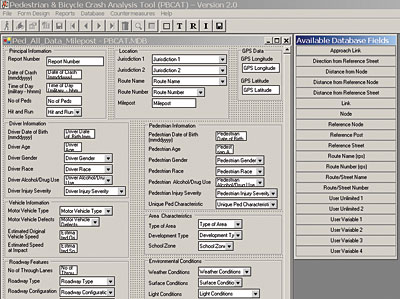
Form Designer — Users can customize the form for inputting crash data and design it to
match the police crash reports used in their community.
-
Group Crash Typing — An alternative version of crash typing is available for users who
do not want the level of detail on crash type offered in PBCAT Version 1.0, which only included the standard
version of crash types.
-
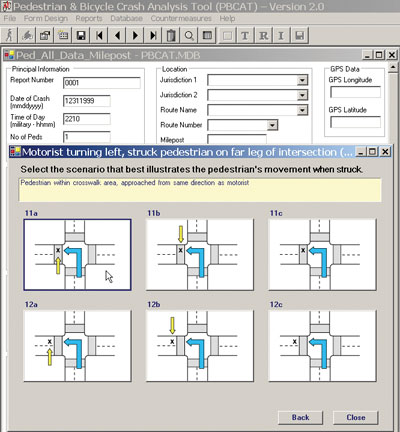
Location Data — Users have the option of recording specific location information, such
as approach and travel direction, for pedestrian crashes occurring at intersections.
-
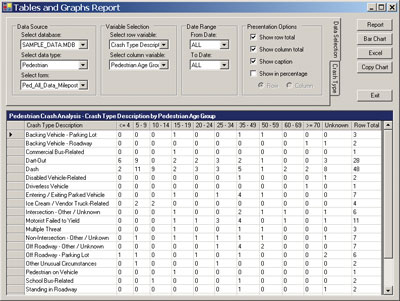
Crash Reports — PBCAT users can produce single variable and multivariable tables within
the application and export the results to Microsoft Excel® for further customization and graphics
production.
-
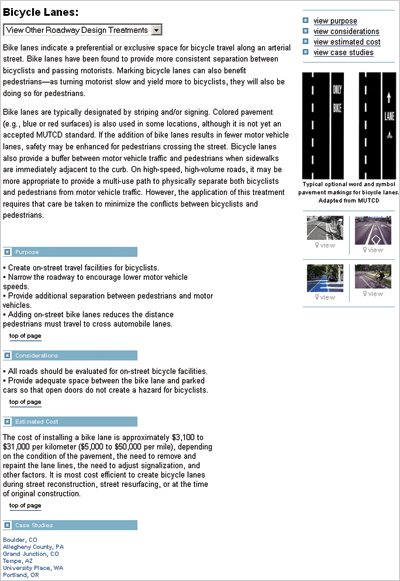
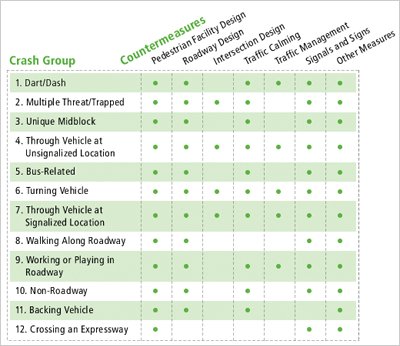
Countermeasures — PBCAT Version 2.0 and higher provides users with access to detailed
descriptions of engineering, education, and enforcement countermeasures that address specific types of
crashes. Each countermeasure description includes a purpose, considerations, estimated cost, and real-world
case studies. (See below for samples of a countermeasure description and matrix.)
-
Expert System Tools — To help users select appropriate countermeasures, PBCAT Version
2.0 and higher includes links to the Web-based Pedestrian Safety Guide and Countermeasure Selection System
(PEDSAFE) and the Bicycle Countermeasure Selection System (BIKESAFE).
- Import/Export Capabilities — The software includes a conversion utility that enables users to import data from PBCAT Version 1.0. In addition, users can export data from PBCAT Version 2.0 and higher in several formats that allow for more sophisticated analyses with other applications, such as Excel and SAS® software.